Showing posts with label craft. Show all posts

Tuesday, August 7, 2018

Update after being gone for a year and Newest Trends in Cardmaking!

Since my daughter turned about 6 months old I haven't crafted. At first I was sad because it's something I really enjoy and a nice relaxing way to release my creative desires. However, motherhood is an entirely new and exciting endeavor for me and I have embraced it entirely. My days that used to involve catering to my own needs and desires are now spent fulfilling the needs of my toddler. That being said, now that she's almost 2 years old I can get away with doing a few more things for myself. I haven't been able to film a video or even get a crafting session in yet but I've been able to color with her and at least use my supplies!

 That being said I checked in on what the latest trends are and wanted to make a list of what I have noticed has changed while I wasn't looking!

 Let's start with one of my personal favorite innovative artists - Tim Holtz!

 Tim Holtz has repeatedly disrupted the crafting scene with his out of the box ideas for new products. Whatever he creates the entire crafting community usually builds off of and it sets the tone for the newest trends. A quick peek at his website shows he hasn't slowed down one bit on his innovations. One of his newest products has me chomping at the bit!
 When I first started crafting years ago I went out and bought a ton of the adirondack alcohol inks and then sat there saying "Well, dripping these on glossy cardstock is fun and all, but what do I do with these now?" This new product is the answer!
 Alcohol Lift Ink works with stamps to lift the alcohol ink off of a porous surface and transfer it to a non-porous surface. I think of this as making a custom palette on Yupo and having endless ink combinations and beautiful rainbows to stamp! It makes me excited again to own tons of alcohol inks! I think that is just what Tim was hoping when he came up with these new products. In addition to stamping beautiful images with multiple colors, you are left with the ghost image of the stamp on the Yupo paper and you can make a card using that.

 This is my favorite image from his blog post about these products:


BOTH of these images would make an amazing card base or even a card and just add a black or white stamped sentiment. Gorgeous!

He also shows that you can use the new Alchol Lift Ink with an ink blender and a stencil. I LOVE stencils and even used to make my own. I highly recommend working on a glass surface with alcohol inks, especially when stenciling, since it makes clean up MUCH easier.

You can see his blog post and a video using the products here, http://timholtz.com/new-alcohol-ink-products/ . To avoid this blog post from being overly long I will spotlight another product in my next post. I hope you're as excited as I am!

If you want to purchase any of  these products I have included some links in the text and below. I will get a little commission, that doesn't increase the price of the products, as a thanks from you!


Monday, June 26, 2017

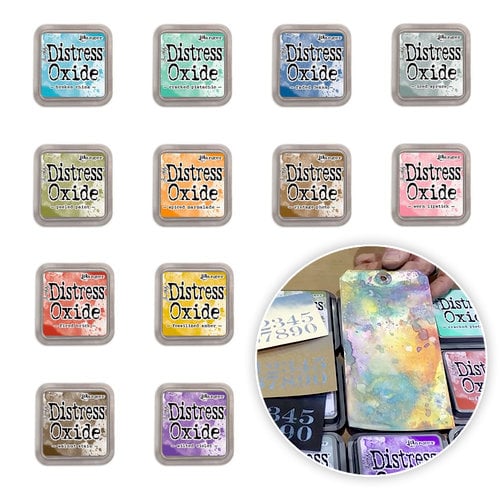
Craft News: Tim Holtz Releases 12 NEW Distress Oxide Colors!

That's right. We've all been anxiously awaiting more of these beauties to be released and now they're here!

The 12 new colors are :


Tim Holtz Distress Oxide Inks are manufactured by Ranger Industries in New Jersey in the United States.

In a press release e-mail sent just a few hours ago Ranger said, " Introducing 12 new colors of Tim Holtz Distress® Oxide Ink Pads, a water-reactive dye & pigment ink fusion that creates an oxidized effect when sprayed with water. Use with stamps, stencils and direct to surface. Blend using Ink Blending Tools and Foam. All oxide colors are available in 3" x 3" ink pads and coordinating .5 oz re-inkers.".

The first 12 colors of Distress Oxide Inks were released earlier this year at Creativation. Creativation ,formerly known as the CHA Mega Show, is the creative industries largest trade show that happens once a year in January. Since Creativation was moved to Phoenix last year I had the opportunity to finally attend. I saw these inks in person and knew they would be a hit. Retailers have been having a hard time keeping them on their shelves. 

The 12 colors that were released in January: 


This is a nice start for a palette of colors. The Distress Ink palette consists of 61 colors (including white) so we can only speculate that eventually we will get all of the Distress Ink colors in Distress Oxide Ink form. 

Distress Inks and Distress Oxide Inks come in a 3 x 3" ink pad and retail for $5.99 each. Distress Inks are also offered in a mini cube form. We can only hope that Distress Oxides will eventually be released in this space saving option. Currently the white Distress Ink is not offered in the mini cube form. This can lead to speculation that maybe a formula such as distress oxide inks does not keep well on a smaller ink pad. I won't be holding my breathe that the Distress Oxides may be released in a smaller 1 x 1 " size. 

3 x 3 " cube: 


1 x 1 " Mini Cube: 

Want to get your hands on some Distress Oxide Inks? Here's some links! 


Ranger Ink - Tim Holtz - Distress Oxides Ink Pad Kit - Complete 2017 Bundle - $61.19

Retail Price: $72.00
You Save: $10.81
from: Scrapbook.com


Tim Holtz Distress OXIDE INK PAD SET OF 12 Ranger RANGER97 - $71.99

from: Simon Says Stamp


What is your favorite current Distress Oxide Color? I just find all of the blues so dreamy but I think I would have to pick Cracked Pistachio. I can't wait for them to bring out Mermaid Lagoon!


* Affiliate Links are used at no cost to you. They get me a small commission if you do purchase something using this link. It does not cost you anything. It is your way of saying "thanks for the suggestion". It helps support my hobby and will help me to bring more content to the blog and my youtube channel, IntoxicatingArts. Thank you!

Wednesday, April 13, 2016

Is the Silhoutte PixScan Mat Worth It?

In one word, Yes.

Here's a video of me using the PixScan Mat with Stamped Images:


Here's a video of me using the Pixscan Mat with Patterned Paper:


Both of these videos show me using the mat for the FIRST TIME with each technique. There's actually some things I did in these videos which I later found out was the Long way and there's short cuts to be learned. For instance, the patterned paper video shows me taking a lot of work to get those cut out but I could have adjusted a few settings and got it done much quicker. Also, the calibration was never done so each image is cut slightly too far right and too far down.

Even with these few short comings because I needed to learn some tricks, I was still very happy with how well the PixScan mat works. Not only can it cut images out of some very busy patterned paper, but it can REPLACE die sets that would normally cost me $20.00 each! A lot of people like to buy the die set to cut out their stamp set and before they know it, they're spending $35-50 for a set of stamps and dies. That's a pretty high price especially if you want dies for all of your stamp sets. Having the Silhouette PixScan mat means NEVER having to buy die sets for your stamps ever again!

You can also trace an image from the internet and BOOM! You have a cloud, bird, sun, flower, etc. The PixScan mat is not needed to trace images off the internet, but I just wanted to mention another great function of the Silhouette. I actually used it to turn a stamp into a die cut. Pretty cool if you ask me.

If you want to buy the PixScan Mat, Amazon has it for a great low price.

    
I personally purchased a Silhouette Cameo 2 using this great bundle on Amazon: 

Friday, January 15, 2016

Un-Boxing The Silhouette Cameo 2 Bundle from Amazon

Here's a video of me un-boxing the Silhouette Cameo 2 Bundle I purchased from Amazon.


It was extremely easy to get set up and make my first cuts. I immediately dove in to using the included PixScan Mat, which I forgot to show in the video.

Even though I haven't had much time to play with this electronic die cutting machine yet, I can already tell you that it is pretty amazing. I will be trying to cut various materials in the near future to find out exactly what it can handle. It cut my 140lb Watercolor Cardstock with no hiccups. The machine is not what I would consider quiet, but it is quieter than my SLICE Machine. It is pretty light for how large it is and that is nice since it does not have a permanent spot on my desk and I have to slide it in and out of a little cubby in my IKEA Kallax shelving unit.  ( LOVE that shelving unit with desk attached by the way!). When I first got the machine out of the box I actually dropped it from maybe 1-2 ft onto my desk. I was terrified! However, it still works just like it should. I'm considering getting the Silhouette Designer Edition of Silhouette Studio to unlock more design potential, but I haven't made any final decisions on that quite yet.

I'll be back with some videos of the PixScan mat!


Welcome to the Craft Review

Here's what you can expect to find here:

 Honest and thorough reviews of art and craft related items such as :
    a. Tools
    b. Media
    c. Designers
    d. Companies
    e. Stamps 
    f. Dies and Embossing
    g, anything else art or craft related I want to review! 

I wanted to start this website because I have an online store, Intoxicating Arts, where I sell what I consider "the good stuff". I only carry items that I would or have personally used. This review website will allow me the chance to show you an in depth review of some of the items I carry in my store as well as other items that I purchase off of Amazon for my personal use but do not sell in my store. Occasionally I may link to other websites that sell products I love and are not available for purchase in my store or Amazon. 

My rating system will be based off of ease of use, value for your money (which includes quality and uniqueness), fun factor, and how often I would use the product. This rating system may change if I find a better way to fairly evaluate products. 

I hope you'll join me for my very first post which will be the un-boxing of a brand new Silhouette Cameo 2 Bundle!